If you’re saving user colours, tweaking animations, or just trying to debug what you see on screen, Color doesn’t give you direct access to its components. In this post, we’ll fix that with simple extensions for UIColor, NSColor, and Color to reliably extract RGBA values across platforms. It’s a lightweight solution that works on all platforms.
UIColor
UIKit gives us built-in support for extracting colour components via the getRed(_:green:blue:alpha:) method, provided the colour can be represented in the RGB colour space. So this extension really is just a more convenient way to get to these values.
Here’s the extension:
extension UIColor {
    var rgba: (red: CGFloat, green: CGFloat, blue: CGFloat, alpha: CGFloat) {
        var red: CGFloat = 0
        var green: CGFloat = 0
        var blue: CGFloat = 0
        var alpha: CGFloat = 0

        getRed(&red, green: &green, blue: &blue, alpha: &alpha)

        return (red, green, blue, alpha)
    }
}
This approach handles nearly all colours you’ll work with in a SwiftUI context. If the colour isn’t compatible with RGB, the method will return zeroes — but that’s a rare edge case unless you’re dealing with system-defined colours or custom colour spaces.
NSColor
On macOS, NSColor supports many colour spaces, so you must explicitly convert it to one that supports RGB components. In this case, we use .deviceRGB:
extension NSColor {
    var rgba: (red: CGFloat, green: CGFloat, blue: CGFloat, alpha: CGFloat) {
        let convertedColor = self.usingColorSpace(.deviceRGB)
        return (
            red: convertedColor?.redComponent ?? 0,
            green: convertedColor?.greenComponent ?? 0,
            blue: convertedColor?.blueComponent ?? 0,
            alpha: convertedColor?.alphaComponent ?? 0
        )
    }
}
By using optional chaining and nil coalescing, we gracefully handle any cases where conversion fails by returning 0 for each component.
SwiftUIColor
Finally, we bring it all together with an extension on SwiftUI’s Color type. Internally, SwiftUI converts Color to UIColor or NSColor, which we can use to get the RGBA values.
extension Color {
    var rgba: (red: CGFloat, green: CGFloat, blue: CGFloat, alpha: CGFloat) {
        #if os(macOS)
        let convertedColor = NSColor(self)
        #else
        let convertedColor = UIColor(self)
        #endif

        return convertedColor.rgba
    }
}
This abstraction allows us to write cross-platform SwiftUI code that inspects colour components in a way that feels native and idiomatic, without worrying about the underlying platform-specific types.
Example: Reading RGBA Components in SwiftUI
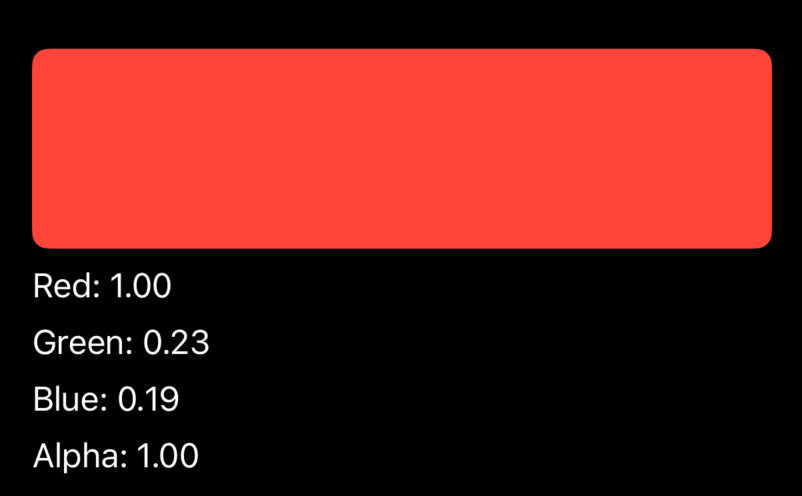
Let’s see how this might be used in a SwiftUI view with a complete set of our extensions:
import SwiftUI

struct ColourDetailsView: View {
    let colour: Color

    var body: some View {
        let rgba = colour.rgba

        VStack(alignment: .leading, spacing: 8) {
            Rectangle()
                .fill(colour)
                .frame(height: 100)
                .cornerRadius(8)

            Text("Red: \(rgba.red, specifier: "%.2f")")
            Text("Green: \(rgba.green, specifier: "%.2f")")
            Text("Blue: \(rgba.blue, specifier: "%.2f")")
            Text("Alpha: \(rgba.alpha, specifier: "%.2f")")
        }
        .padding()
    }
}

#Preview {
    ColourDetailsView(colour: .red)
}
This simple view gives you both a visual and numerical representation of the colour’s components, useful for debugging or UI prototyping.
Summary
SwiftUI makes it easy to define and use colours, but inspecting them requires some help from the underlying frameworks. By bridging Color to UIColor or NSColor, we can cleanly and safely extract RGBA components for any colour.
This extension gives you a single API to work with across all platforms:
- Simple and concise: just call .rgba on any Color
- Cross-platform compatible with minimal code
- Useful for debugging, persistence, animation, and more
This is the first in a series of practical SwiftUI extensions I rely on across all my projects. These small tools help bridge gaps in the framework and streamline your workflow, making it easier to build robust, flexible, and expressive UIs.
Complete Code
And finally, for ease of use here is the complete code we used for easy copying:
import SwiftUI

struct ColourDetailsView: View {
    let colour: Color

    var body: some View {
        let rgba = colour.rgba

        VStack(alignment: .leading, spacing: 8) {
            Rectangle()
                .fill(colour)
                .frame(height: 100)
                .cornerRadius(8)

            Text("Red: \(rgba.red, specifier: "%.2f")")
            Text("Green: \(rgba.green, specifier: "%.2f")")
            Text("Blue: \(rgba.blue, specifier: "%.2f")")
            Text("Alpha: \(rgba.alpha, specifier: "%.2f")")
        }
        .padding()
    }
}

#Preview {
    ColourDetailsView(colour: .red)
}


extension Color {
    var rgba: (red: CGFloat, green: CGFloat, blue: CGFloat, alpha: CGFloat) {
#if os(macOS)
        let convertedColor = NSColor(self)
#else
        let convertedColor = UIColor(self)
#endif

        return convertedColor.rgba
    }
}


#if os(macOS)
extension NSColor {
    var rgba: (red: CGFloat, green: CGFloat, blue: CGFloat, alpha: CGFloat) {
        let convertedColor = self.usingColorSpace(.deviceRGB)
        return (
            red: convertedColor?.redComponent ?? 0,
            green: convertedColor?.greenComponent ?? 0,
            blue: convertedColor?.blueComponent ?? 0,
            alpha: convertedColor?.alphaComponent ?? 0
        )
    }
}
#else

extension UIColor {
    var rgba: (red: CGFloat, green: CGFloat, blue: CGFloat, alpha: CGFloat) {
        var red: CGFloat = 0
        var green: CGFloat = 0
        var blue: CGFloat = 0
        var alpha: CGFloat = 0

        getRed(&red, green: &green, blue: &blue, alpha: &alpha)

        return (red, green, blue, alpha)
    }
}
#endif

Leave a comment